Introducing the AI-Powered Error Module: Find, Prioritise, and Fix Website Errors Faster
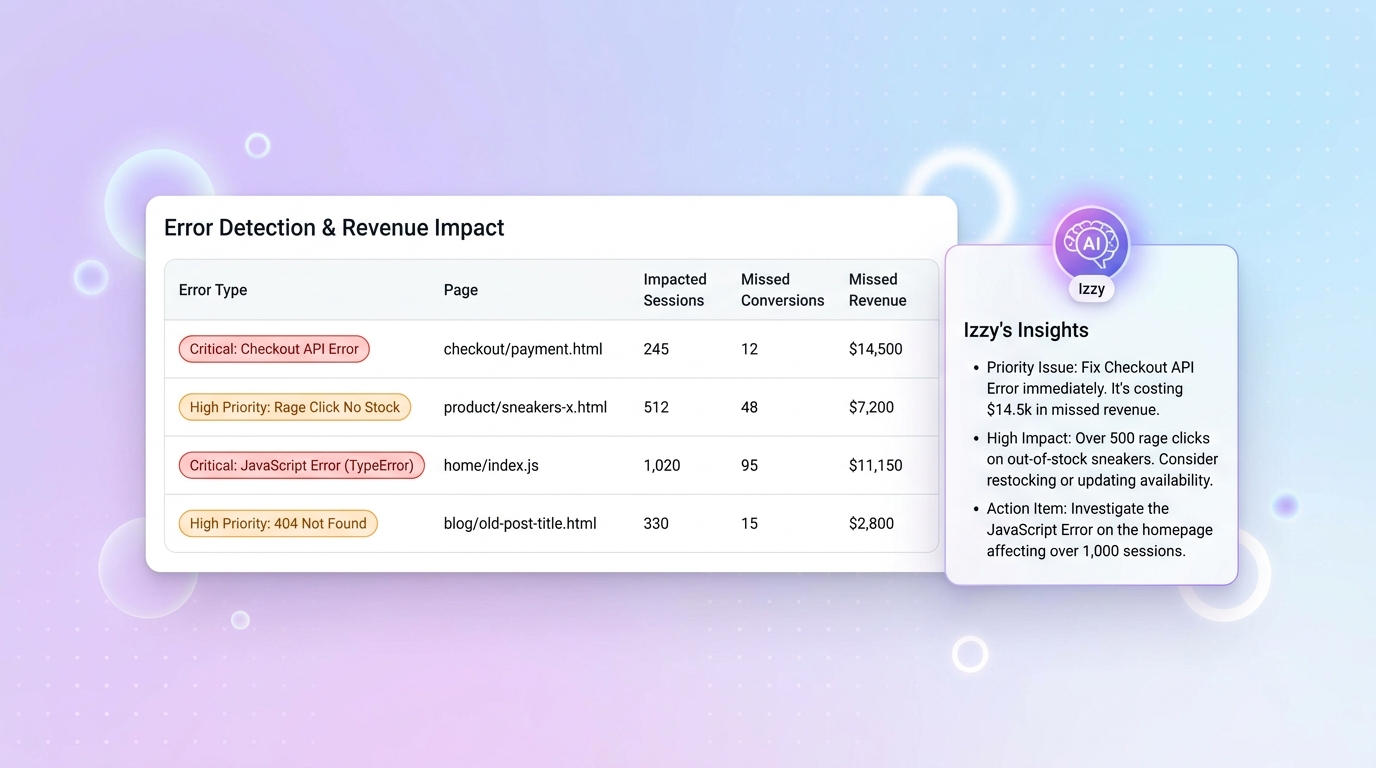
What is the Error Module?
The Error Module is a new addition to Insightech that proactively scans your website for every kind of front-end issue—error messages, 404s, rage clicks, dead clicks, JavaScript errors, and API failures—and tells you exactly how much each one is costing you in lost conversions and missed revenue. Paired with Izzy, our built-in AI analyst, it turns a sprawling list of technical errors into a prioritised action plan your whole team can understand.
The Problem
Errors are everywhere on modern websites, but most teams only find out about the painful ones after a customer complains. Technical error logs are noisy, full of false positives, and rarely tied to business outcomes. By the time an error is flagged, triaged, and assigned, you’ve already lost conversions and revenue—often without knowing how much.
Digital teams need a way to surface the errors that actually block customers from converting, quantify their impact in dollars, and hand them to engineering with enough context to fix them fast.
How the Error Module Works
The Error Module continuously scans every session on your website and automatically categorises friction into the error types that matter:
- Error messages — detected through a customisable set of keywords you control in settings
- 404 errors — broken pages and dead links customers hit during their journey
- Rage clicks & dead clicks — UX friction signals where users click repeatedly or click elements that don’t respond
- JavaScript errors — front-end script failures that break page functionality
- API errors — failed network requests that silently block conversions
For every error, Insightech calculates highly impacted sessions—cases where the user dropped off immediately after hitting the error, a strong signal they were blocked from progressing. From there, we use your live conversion rates to estimate how many conversions and how much revenue each error is costing you.
The result is an aggregated, ranked list of the top errors across your entire site—no more staring at raw logs wondering where to start.
Meet Izzy: Your AI Error Analyst
At the top of the Error Module sits Izzy, Insightech’s AI analyst. With a single click, Izzy reads the full list of errors and gives you a plain-English summary of what’s going on across your site—highlighting things like critical checkout failures, validation hurdles, or promotional pages that are turning into dead ends.
Izzy does more than summarise. She also:
- Filters out false positives — errors that look noisy but aren’t actually blocking users
- Explains individual errors — click into any single error and Izzy summarises that specific issue, including technical errors like API failures in language suitable for both business and engineering teams
- Translates tech-speak — so eCommerce managers, CRO leads, and UX designers can communicate confidently with their engineering counterparts
Izzy’s job is to cut through the noise and show your team what to work on next.
From Error to Fix in Minutes
Spotting the error is only half the battle. The Error Module is built to take you from discovery to resolution in just a few clicks:
- See the business impact — every error shows highly impacted sessions, missed conversions, and missed revenue, so you always know what it’s worth fixing
- Jump to a session replay — click an error to land directly on the moment it fires in a real user session, with full context of what the user did beforehand
- Save a note — pin your observations to the exact moment in the replay so teammates can see what you saw
- Create a task — turn any error into a task in Insights Hub, with background details, a replay link, monthly impact estimate, priority, and a bug flag—ready for engineering to pick up
Because tasks flow straight into Insights Hub, your team gets a single backlog of prioritised fixes, each one backed by quantified impact and a reproducible example.
Who Benefits from the Error Module
- eCommerce Managers — quantify the revenue impact of checkout and product-page errors and make the case for engineering time
- CRO Teams — find hidden friction that’s suppressing conversion rates before it shows up in your funnel reports
- UX Designers — use rage click and dead click data to pinpoint interactions that are confusing users
- Product Teams — prioritise the bug backlog by business impact, not just severity
- IT & Engineering Teams — get reproducible bug reports complete with session replays, front-end code, and exact triggers—no more “can’t reproduce” tickets
Get Started Today
The Error Module is available now to all Insightech users—no additional setup required. Just open the Errors section in your sidebar and Izzy will start surfacing the issues that matter most.
Start in three steps:
- Open the Error Module — see the top errors on your site ranked by business impact
- Ask Izzy for a summary — get an instant plain-English briefing of what’s going wrong
- Turn errors into tasks — send prioritised, evidence-backed fixes straight to your team through Insights Hub
Stop guessing which errors deserve engineering time. Let Insightech show you exactly which ones are costing you revenue—and exactly how to fix them.
Have questions about the Error Module? Get in touch—we’re always happy to walk you through it.